

Introduction
Spacebar Clicker is a simple browser game built around one familiar action: pressing the spacebar. The objective is to collect points or spacebars, depending on the version, and use the game’s progression mechanics to increase your total. What begins as a repetitive keyboard action can develop into a longer challenge involving upgrades, automation, and steadily growing numbers.
The original game was created by Bruno Croci for the 2021 js13kGames competition. Its deliberately simple concept made it easy to understand, while the incremental gameplay gave players a reason to keep progressing. Other websites have since published their own versions, and their features may differ from the original release.
This guide explains what Spacebar Clicker is, how to play it, which strategies can help, what makes clicker games appealing, and what to check before choosing a version online.
Quick Overview of Spacebar Clicker
| Detail | Information |
|---|---|
| Game name | Spacebar Clicker |
| Game category | Casual and incremental gaming |
| Original creator | Bruno Croci |
| Original release context | js13kGames 2021 competition |
| Main action | Press the spacebar to collect points or in-game items |
| Typical gameplay | Repeated input and incremental progression |
| Possible mechanics | Upgrades and idle progression, depending on the version |
| Platform | Browser-based versions are available |
| Intended audience | Casual players and fans of simple games |
| Installation | The browser-based format generally allows play without a traditional game installation |
| Important distinction | Features vary between the original game and third-party adaptations |
The original game’s competition listing identifies Bruno Croci as its author and classifies it under desktop, mobile, and web monetisation categories. Other versions may offer different interfaces, progression systems, and controls.
What Is Spacebar Clicker?
Spacebar Clicker is a browser-based game centred on pressing a keyboard’s spacebar. The original version was developed by Bruno Croci for the js13kGames 2021 competition, an event known for games created within a strict code-size limit.
The original project’s description summarises its central idea: press the spacebar and collect as many spacebars as possible. This straightforward premise avoids complicated controls and lets players understand the main objective almost immediately.
The game belongs to the broader category of incremental or idle games. These games generally reward repeated actions and gradual improvement. Depending on the design, players may collect points, unlock upgrades, improve their earning rate, or eventually rely on automated progress.
However, not every game using the name Spacebar Clicker follows exactly the same formula. Some versions focus on incremental progression, while others emphasise manual clicking, scores, speed, or achievements. Checking the particular version is the best way to understand its actual mechanics.
What Makes the Game Different?
The main attraction is its simplicity. Instead of learning a large set of controls, players concentrate on a single repeated action and observe the results.
That simplicity also creates a clear feedback loop. Each successful press contributes to the goal, and visible progress gives players a reason to continue. In versions with upgrades, decisions about spending points add another layer to the experience.
Spacebar Clicker is therefore more than a test of how quickly someone can press a key. In its incremental form, it also encourages players to consider how they can increase progress over time.
How Does Spacebar Clicker Work?
The basic gameplay depends on the version being played, but the main idea is straightforward: perform an action, earn a reward, and use that reward to move closer to the next goal.
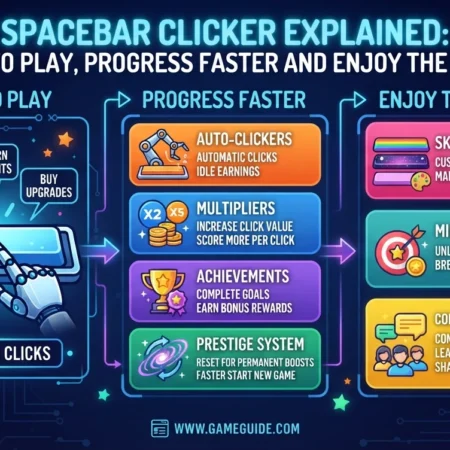
1. Press the Spacebar
In the original concept, pressing the spacebar is the central interaction. The game responds to the player’s input and advances the in-game objective.
A browser version may also support mouse clicks or touchscreen input. These alternatives should be treated as version-specific features rather than guaranteed functions of every release.
2. Collect Points or In-Game Items
Each accepted action contributes to the player’s progress. Depending on the implementation, the displayed total might represent points, collected spacebars, or another score.
Watching this counter is useful because it shows whether the input is being registered and how quickly progress is accumulating.
3. Use Available Progression Mechanics
Incremental versions may let players exchange accumulated points for upgrades. Those improvements can increase the value of each action or provide passive progress.
Not every version includes an upgrade shop, automatic production, or a long progression system. Check the instructions and controls displayed in the game before planning a strategy around these features.
4. Work Towards the Next Goal
As the total grows, players can set new targets. These might include reaching a particular score, unlocking an available upgrade, or improving a previous result.
The game is usually open-ended in spirit: the satisfaction comes from seeing progress continue rather than completing a complex storyline.
How to Play Spacebar Clicker
Getting started is generally easy, particularly when using a browser-based version.
Step 1: Choose a Version
Open a trusted page that hosts the game. If you want to experience the original release, start with the Spacebar Clicker listing on js13kGames.
Other sites may host adapted or independently developed versions. Read the page description to understand which game you are opening.
Step 2: Read the On-Screen Instructions
Check how the game accepts input. The spacebar is central to the original concept, but individual versions may support additional controls.
Some implementations also include buttons for starting, pausing, resetting, or purchasing upgrades. Learn what each control does before using it.
Step 3: Begin Pressing the Spacebar
Once the game starts, press and release the spacebar to register actions. Watch the score or collection counter to confirm that your input is working.
If the game does not respond, click the game area first so the browser window has the appropriate focus. Be careful not to press the spacebar while a text field is selected, because the key may insert a space instead of controlling the game.
Step 4: Monitor Your Progress
Observe how quickly your total increases. In versions with upgrades, the available balance and the cost of the next improvement can help guide your decisions.
Players can also set a personal target, such as reaching a certain score or improving a previous session.
Step 5: Explore Other Mechanics
If the version includes upgrades, achievements, or passive earning, try them one at a time to understand their effects. Avoid assuming that instructions for another Spacebar Clicker website apply to the version currently open.
This approach makes the game easier to learn without relying on potentially inaccurate guides.
Understanding Upgrades and Progression
Upgrades are a common feature of incremental games, although their availability and behaviour depend on the specific Spacebar Clicker version.
When included, they create a choice between continuing to earn rewards manually and spending accumulated points to improve future progress.
Manual Clicking
Manual input is the starting point in many clicker games. Players press the spacebar repeatedly and accumulate rewards through direct interaction.
This method is simple and gives immediate feedback. Its main limitation is that progress depends on continued input unless the game offers another earning method.
Passive Progress
Some incremental versions introduce upgrades that generate points automatically. Once purchased, these systems can increase the total without requiring a new press for every reward.
Passive earning changes the strategy because players can compare the cost of an upgrade with the benefit it provides. The best option depends on the actual numbers shown in the version being played.
Click Multipliers
Certain adaptations may increase the reward received from each action. A multiplier can make manual clicking more valuable, particularly when a player is actively interacting with the game.
Other versions may not include this mechanic at all. Check the upgrade descriptions instead of assuming that every Spacebar Clicker implementation uses the same system.
Achievements and Milestones
Some versions add achievements or milestone targets to give players smaller goals beyond increasing the total score.
These rewards can make a simple game feel more structured. However, achievement lists and unlock requirements are not universal features of the original title or every adaptation.
Tips to Progress More Efficiently
A few practical habits can make Spacebar Clicker easier to enjoy. The best strategy will depend on whether the selected version is focused on manual input or incremental upgrades.
1. Learn the Controls Before You Start
Confirm which key or button registers an action. If the game supports both keyboard input and mouse clicks, try each method to see which feels more comfortable.
Understanding the controls also prevents wasted effort when the game window is not receiving keyboard input.
2. Set a Realistic Goal
Rather than clicking indefinitely, choose a manageable target for each session. You might aim to reach a particular score, purchase an upgrade, or beat your previous result.
Clear targets make progress easier to recognise and help prevent a repetitive game from feeling aimless.
3. Read Upgrade Descriptions Carefully
When upgrades are available, examine their costs and effects before spending points. A more expensive option is not necessarily the most efficient choice.
Compare the benefit of each available purchase with the progress required to afford it. This is more reliable than following an upgrade order copied from a different version.
4. Balance Active Play with Automation
If the game includes passive earning, consider whether an upgrade can continue producing rewards while you take a break. An automated system may be more useful over a long session than a small increase to manual input.
On the other hand, a version focused on speed or manual scoring may offer no passive system at all. In that case, timing, control, and consistency matter more than upgrade planning.
5. Avoid Unnecessary Third-Party Tools
You do not need to install unknown software simply to press a key in a browser game. Avoid scripts, suspicious extensions, and downloads that promise unrealistic scores or instant progression.
Besides creating security risks, automated tools may undermine the challenge the game is designed to provide.
6. Take Breaks During Long Sessions
Repeated keyboard actions can become uncomfortable when continued for too long. Keep your hands relaxed, use a comfortable posture, and stop if you experience discomfort.
The goal is to enjoy the game rather than turn a simple activity into a strain on your hands or wrists.
Why Is Spacebar Clicker Popular?
Simple games can be appealing because they reduce the effort required to begin playing. Spacebar Clicker illustrates this principle through its single-action concept.
Easy to Understand
Players do not need to learn a complicated control scheme before starting. The central action is familiar to anyone who uses a keyboard.
That low barrier to entry makes the game approachable for casual sessions.
Immediate Feedback
A visible score or collection total helps players see the effect of each action. In incremental versions, the feedback becomes more noticeable as upgrades increase the rate of progress.
This direct connection between action and result is a major part of the clicker-game experience.
Gradual Progress
Incremental mechanics can turn small gains into a larger long-term target. Players often enjoy seeing how a modest starting total grows through repeated actions and strategic purchases.
The appeal comes from the progress loop rather than a complicated narrative or competitive multiplayer system.
Short Sessions
The simple objective makes the game suitable for brief breaks. Players can try to improve a score or reach a milestone without committing to a long campaign.
Still, the time spent playing is a personal choice. A game that feels relaxing to one person may feel repetitive to another.
Spacebar Clicker on Desktop and Mobile
The experience depends on the version and the device being used.
Desktop and Laptop
A desktop or laptop keyboard provides direct access to the spacebar. This is a natural setup for the original game’s central action.
If pressing the key does not work, click inside the game area and try again. Also check whether the browser has selected a button, address bar, or text field that is intercepting the input.
Mobile Devices
Some browser versions are adapted for touchscreen use and provide an on-screen button or alternative interaction. The original competition listing includes mobile among its categories, but that should not be taken as proof that every current host offers the same mobile experience.
Before playing on a phone or tablet, check whether the page supports touch controls and whether its interface fits the screen.
Browser Compatibility
Browser games rely on the code and features used by the particular implementation. If a game fails to load, try a current browser, disable interfering extensions for the page if appropriate, and reload the site.
Do not install a separate application simply because an unfamiliar page claims it is necessary. Confirm the developer and download source first.
Original Game vs Other Versions
The name Spacebar Clicker is used across multiple online implementations. Some are adaptations of the original concept, while others offer their own systems for scoring, upgrades, or achievements.
The original game can be explored through its js13kGames 2021 listing. Its creator’s archived GitHub repository also identifies it as an idle game made for the 2021 competition.
Other websites may add features that are not present in the original release. These could include a different upgrade shop, new milestones, altered scoring, or additional interface options.
| Comparison Point | Original Release | Other Versions |
|---|---|---|
| Creator | Bruno Croci | Depends on the host or developer |
| Original context | js13kGames 2021 | May be a remake, adaptation, or separate implementation |
| Main concept | Collect spacebars through pressing | Usually inspired by the same basic idea, but rules can vary |
| Upgrades | Check the original game itself for its mechanics | May include modified or additional systems |
| Achievements | Do not assume every adaptation’s achievement system is included | Depends on the version |
| Controls | Follow the original game’s interface | May support different keyboard, mouse, or touch inputs |
| Best way to verify | Use the original listing and project repository | Read the host’s instructions and test the available mechanics |
Players should be cautious with guides that present exact upgrade costs or large lists of features without identifying the version they describe. The same game name does not guarantee identical mechanics.
Is Spacebar Clicker Safe to Play?
A browser-based game can be straightforward to access, but safety still depends on the website hosting it. The name alone does not guarantee that every page offering Spacebar Clicker is trustworthy.
Use the following precautions:
- Choose a reputable host. The original js13kGames listing is a useful starting point for identifying the original release.
- Avoid suspicious downloads. A simple browser game should not require you to install an unrelated executable from an unfamiliar source.
- Check requested permissions. Be wary if a gaming page asks for information or access that appears unrelated to its purpose.
- Protect personal details. Avoid entering passwords, payment information, or sensitive data unless there is a clear and verified reason.
- Watch for misleading buttons. Some third-party pages may display advertisements or links that resemble game controls. Check the destination before clicking.
- Use appropriate security settings. Keep your browser updated and avoid extensions or scripts from unknown providers.
The original game’s public repository also states that rights to the game belong to its author and that copying the code or name requires express authorisation. Its source is provided for learning purposes, so public code availability should not be interpreted as unrestricted permission to republish the game.
These checks help distinguish a normal gaming experience from a page that may be attempting to collect information, distribute unwanted files, or mislead visitors.
Benefits and Limitations of Spacebar Clicker
Like other casual browser games, Spacebar Clicker has advantages and trade-offs.
| Benefits | Limitations |
|---|---|
| Simple controls and an easy starting point | Repeated input may become monotonous |
| Clear feedback through scores or collected items | The experience depends on the version |
| Incremental progression in versions that support it | Some adaptations may have limited depth |
| Can suit short gaming sessions | Long sessions can become repetitive |
| Browser-based versions may not require installation | Third-party hosting pages vary in quality |
| Offers a straightforward way to explore clicker-game mechanics | Not every version includes upgrades or passive earning |
The game is best suited to players who enjoy simple goals, repeated actions, and gradual progress. Those looking for complex stories, detailed exploration, or competitive multiplayer features may prefer a different genre.
Final Thoughts
Spacebar Clicker demonstrates how a small, familiar action can become an engaging game through clear feedback and incremental progress. The original release by Bruno Croci was created for js13kGames 2021, and its straightforward premise remains easy to understand.
The experience you get today depends on which version you choose. Some implementations emphasise idle progression and upgrades, while others may use different scoring systems or controls. Checking the exact game is more reliable than assuming every guide describes the same release.
For the best experience, choose a reputable host, learn the controls, set a manageable goal, and take breaks during longer sessions. If you enjoy casual games built around simple actions and visible progress, Spacebar Clicker may be worth trying.
What is Spacebar Clicker?
Spacebar Clicker is a simple browser-game concept in which players press the spacebar to collect spacebars or earn points. The original version was created by Bruno Croci for the 2021 js13kGames competition.
Who created the original Spacebar Clicker?
The original game listing identifies Bruno Croci as its creator. The project was developed for js13kGames 2021, and its source repository provides further background on the game.
How do you play Spacebar Clicker?
Open a version of the game, follow its on-screen instructions, and press the spacebar to register actions. If the game supports upgrades, use accumulated points according to the options displayed in that version.
Is Spacebar Clicker an idle game?
The original game is described as an idle game in its project repository. Other versions may focus more heavily on manual clicking, timed scoring, or different progression mechanics.
Can I play Spacebar Clicker on mobile?
Some versions support mobile devices or touchscreen controls. Compatibility depends on the particular host and implementation, so check the page before assuming that every version works on a phone or tablet.



No Comment! Be the first one.