

Introduction
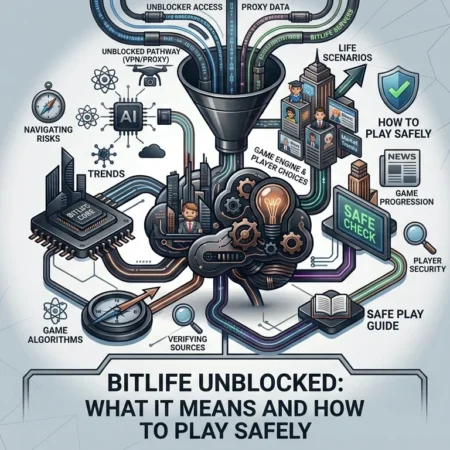
Searching for BitLife Unblocked usually means looking for a way to play BitLife when access to the game appears restricted on a school, workplace, public, or managed network. The phrase can also refer to websites that claim to offer BitLife through a browser without requiring the official app.
There is an important distinction to understand, though. BitLife Unblocked is not identified by Candywriter as a separate official version of BitLife. Candywriter describes BitLife as its original text-based life simulator, while the official app is distributed through supported app stores.
That difference matters because some websites using the “unblocked” label may not be connected with the game’s developer. Using an unofficial website, modified application, or unknown download can introduce security, privacy, compatibility, and account-related risks.
This guide explains what BitLife Unblocked means, how the official game works, what you should know about unofficial versions, and how to approach the game more safely.
Quick Answer: What Is BitLife Unblocked?
BitLife Unblocked is generally a search term used for versions or access methods that claim to let people play BitLife when normal access is restricted.
It does not necessarily refer to an official BitLife edition released by Candywriter. The official game is called BitLife – Life Simulator and is developed by Candywriter, LLC. Candywriter describes it as a text-based life simulation game where players make choices and experience different virtual life paths.
| Question | Answer |
|---|---|
| What is BitLife? | A text-based life simulation game |
| Who makes BitLife? | Candywriter, LLC |
| Is BitLife Unblocked an official edition? | Candywriter does not identify it as a separate official edition |
| Can BitLife be downloaded officially? | Yes, through supported app-store distribution |
| Is the official game free? | The App Store lists it as free with in-app purchases |
| Does BitLife contain mature content? | Yes |
| Should you trust every “unblocked” website? | No; verify the source before using it |
What Is BitLife?
BitLife is a life simulation game created by Candywriter. Instead of controlling a character through traditional action gameplay, players make decisions that shape a virtual person’s life.
Candywriter calls BitLife its original text-based life simulator. The studio says the game launched in 2018 and became one of its best-known titles. Candywriter is headquartered in Miami and became part of the Stillfront Group in 2020.
Gameplay revolves around choices and events. Your virtual character can grow older, pursue education, develop relationships, choose careers, manage money, and encounter unexpected situations.
The game also allows players to explore fictional scenarios involving crime, prison, relationships, entertainment, wealth, and other life paths. The official App Store listing currently highlights features such as the Movie Director expansion and other optional content.
That broad range of choices is one reason people search for BitLife tips, challenges, guides, cheats, and unblocked versions.
What Does “BitLife Unblocked” Actually Mean?
The word unblocked can have several meanings online.
In many searches, users simply want to access BitLife from a network where gaming websites or applications are restricted. Schools, workplaces, libraries, and other organizations may use network filters that block certain categories of websites.
Another use of the phrase appears on third-party gaming websites. These pages may claim that BitLife can be played directly in a browser without downloading the official application.
A third possibility involves modified or repackaged versions of the game. Such downloads may advertise unlocked features, unlimited resources, or premium content.
These situations are not equivalent.
A network restriction is a local access issue. An unofficial website is a third-party service. A modified APK or application is a separate software package that may have been altered from the original.
For that reason, the phrase “BitLife Unblocked” should not automatically be treated as the name of an official product.
Is There an Official BitLife Unblocked Version?
There is no clear indication from Candywriter that BitLife Unblocked is a separate official edition.
Candywriter’s own website identifies BitLife as its flagship life-simulation game and directs users toward the official BitLife experience. The company’s description does not present “BitLife Unblocked” as a separate product.
This distinction is useful when evaluating search results.
A website can use the words “BitLife Unblocked” in its page title without having any connection to Candywriter. Search visibility alone does not establish that a website is an authorized distributor.
The safest approach is to identify the developer and use the official distribution channel whenever possible.
How Does BitLife Gameplay Work?
BitLife focuses on simulated life decisions rather than conventional level-based gameplay.
At the beginning of a life, your character has basic information such as age, location, relationships, and other attributes. As the character grows older, different options and events become available.
You can make decisions about areas such as:
- Education
- Careers
- Relationships
- Marriage
- Children
- Money
- Health
- Travel
- Entertainment
- Crime
- Property
- Fame
- Special career paths
- Expansion content
The exact options can vary according to the version and available content.
One interesting aspect of BitLife is that there is no single required path. A player can attempt to create an ordinary fictional life or deliberately make unusual choices.
The official App Store description reflects this open-ended design by presenting both conventional choices and more extreme fictional scenarios.
Why Do People Search for BitLife Unblocked?
Several reasons can explain the popularity of this search term.
Access Restrictions
Someone may encounter a network where gaming services are restricted. That person might search for an “unblocked” version to find another way to access the game.
Browser Convenience
Some users prefer browser-based games because they do not want to install another application. Third-party pages sometimes market games around this convenience.
School or Workplace Searches
The term can also appear in searches from people looking for games that work on managed devices or networks.
However, a network restriction may exist for a reason. Trying to bypass an administrator’s controls can violate school, workplace, library, or network policies.
Curiosity About Free Features
Some unofficial websites advertise modified versions with premium features supposedly unlocked. Those claims deserve particular caution.
A page promising everything for free is not automatically legitimate. In fact, requests to download unknown files or disable security settings should be treated as warning signs.
Is BitLife Free to Play?
The official BitLife App Store listing currently shows the game as free with in-app purchases. Optional purchases include different forms of premium content and expansion packs.
The exact availability and pricing of individual purchases can vary by country, platform, promotion, and account.
For example, current App Store listings show optional purchases such as Bitizenship, God Mode, Boss Mode, Time Machine, and expansion content.
Therefore, websites advertising a “free premium BitLife” version should not automatically be considered equivalent to the official game.
If a third-party site asks you to install a modified file to unlock paid features, investigate the source before proceeding.
Is BitLife Suitable for Children?
Parents should pay close attention to the game’s current age rating and content description.
The current U.S. App Store listing for BitLife – Life Simulator shows an 18+ age rating. It also identifies mature or suggestive themes, profanity or crude humor, alcohol, tobacco and drug references, simulated gambling, sexual content or nudity, and advertising.
Ratings can vary by country and platform, so checking the local store listing is important.
The content also goes beyond simple career or relationship simulation. The official description mentions fictional criminal activities and other mature scenarios.
Parents should therefore review the current rating and content information before allowing a child to use the game.
Are BitLife Unblocked Websites Safe?
Not every website using the term “BitLife Unblocked” should be considered safe.
The main issue is that third-party pages can have different owners, advertising systems, software, and privacy practices. A page that looks like a simple game site may redirect users to unrelated downloads or advertisements.
Potential risks include:
- Malicious downloads
- Fake APK files
- Aggressive advertising
- Phishing pages
- Unwanted browser notifications
- Tracking
- Fake login forms
- Modified game files
- Suspicious browser extensions
- Misleading download buttons
None of these risks means that every third-party gaming page is malicious. The point is that you should not assume safety simply because a page uses the BitLife name.
The official game has a clearly identified developer: Candywriter, LLC.
How to Play BitLife More Safely
The safest option is to obtain BitLife through an official distribution channel supported by the platform you are using.
1. Identify the Developer
Check whether the listing identifies Candywriter, LLC as the developer.
The official App Store listing names Candywriter, LLC as the developer of BitLife.
2. Avoid Unknown APK Downloads
Android users may encounter websites offering APK files with claims such as “premium unlocked” or “everything free.”
Those files can be difficult to verify. Installing software from an unknown source also creates risks that do not exist when using an official store listing.
3. Be Careful With Login Requests
A basic game page should not need unnecessary personal information.
Never enter passwords, payment details, or other sensitive information into a suspicious third-party page simply because it uses the BitLife name.
4. Do Not Disable Security Features
A website or download that tells you to turn off antivirus protection, browser security, or other safeguards should immediately raise questions.
Security controls exist to reduce the risk of harmful software.
5. Check the URL Carefully
Look at the website address before downloading anything.
Typos, unusual domains, excessive redirects, and pages pretending to be official can all warrant additional caution.
6. Keep Your Device Updated
Operating-system and browser updates often include security fixes. Keeping your device current reduces exposure to known vulnerabilities.
7. Respect Network Rules
If BitLife is blocked on a school or workplace network, check the applicable rules before attempting to bypass the restriction.
The safer choice may simply be to play the game on a personal device and network where gaming is permitted.
BitLife Unblocked vs. Official BitLife
The distinction becomes clearer when the two are compared directly.
| Feature | Official BitLife | “BitLife Unblocked” Third-Party Version |
|---|---|---|
| Developer | Candywriter, LLC | Varies |
| Official product name | BitLife – Life Simulator | Varies |
| Distribution | Supported app stores | Often third-party websites |
| Updates | Provided through official distribution | Depends on the site |
| Developer verification | Clear | May be unclear |
| Premium content | Official in-app purchases | May be advertised as “unlocked” |
| Security confidence | Easier to verify | Requires additional investigation |
| Support | Official developer channels | May have no reliable support |
The biggest difference is source verification.
An official store listing gives you identifiable developer information and platform-level distribution controls. A random “unblocked” website may provide neither.
What About BitLife Unblocked on School Computers?
This is one of the most common contexts associated with the term.
Schools often restrict gaming websites and other services to keep students focused on educational activities. A blocked website does not necessarily mean the game itself is unavailable everywhere.
Trying to circumvent a school’s filtering system can conflict with its acceptable-use policy. Students should follow their school’s technology rules rather than attempting to bypass controls.
If gaming is permitted during a specific break or activity, use the access method approved by the school.
The same principle applies to workplace networks. Employers may restrict entertainment websites to protect productivity, bandwidth, or network security.
Can You Play BitLife in a Browser?
The official BitLife product is primarily presented as a mobile game through app-store distribution.
Third-party websites may claim to offer browser-based BitLife gameplay, but those pages should not automatically be treated as official versions.
Check the source carefully before interacting with downloads, notifications, extensions, or login forms.
A browser page that merely displays information about BitLife is also different from a legitimate browser version of the game. The two should not be confused.
Common BitLife Features
BitLife offers a wide range of fictional life scenarios.
Careers
Characters can pursue different career paths as they age. Certain careers and specialized content may depend on available game features or paid packs.
Relationships
Players can develop relationships, get married, have children, and make choices that affect their virtual lives.
Money and Wealth
Financial decisions can become an important part of gameplay. Players can experience different economic situations depending on their choices.
Crime and Prison
The game also includes fictional criminal scenarios. The official App Store description specifically references crime, prison, smuggling, and bank robbery as possible gameplay situations.
Entertainment Careers
Current content also includes options connected to entertainment. The App Store listing highlights the Movie Director expansion, which adds filmmaking-related gameplay.
Challenges and Special Content
BitLife regularly uses challenges and additional content to create different objectives for players. Availability can change as the game receives updates.
Advantages of Playing the Official Version
Using the official game has several practical benefits.
Reliable distribution: You know which developer published the app.
Regular updates: Official distribution provides a straightforward way to receive supported updates.
Clear purchase information: Paid features appear through the platform’s purchasing system.
Better source verification: The developer identity is visible on the official listing.
Reduced download risk: You avoid many of the unknown files associated with unofficial APK websites.
These advantages do not mean that every official game is appropriate for every person. BitLife’s current age rating and content disclosures should still be reviewed before playing.
Things to Consider Before Using an Unblocked Site
Before opening a third-party BitLife page, ask a few basic questions:
- Who operates the website?
- Is it affiliated with Candywriter?
- Does it ask you to download an APK or executable file?
- Does it request unnecessary personal information?
- Does it ask you to disable security software?
- Are there excessive pop-ups or redirects?
- Does the website make unrealistic claims about premium content?
- Does your school or employer allow access to gaming websites?
If several answers raise concerns, using the site may not be worth the risk.
Frequently Asked Questions
Is BitLife Unblocked an official game?
No separate official BitLife edition called “BitLife Unblocked” is identified by Candywriter. The official product is BitLife – Life Simulator.
Who created BitLife?
Candywriter, LLC created BitLife. Candywriter identifies itself as the studio behind the game and says BitLife launched in 2018.
Is BitLife free?
The official App Store listing shows BitLife as free with optional in-app purchases.
Is BitLife appropriate for children?
The current U.S. App Store listing gives BitLife an 18+ age rating and identifies mature themes, profanity or crude humor, substance references, simulated gambling, and sexual content or nudity. Parents should check the rating available in their own country.
Are BitLife Unblocked APK files safe?
There is no general guarantee that third-party APK files are safe. An unknown APK can come from an unverified source and may introduce security or privacy risks.
Can I play BitLife on a school computer?
That depends on the school’s technology policy and the device or network restrictions. If the game is blocked, do not assume that bypassing the restriction is permitted.
Does BitLife have premium features?
Yes. The official App Store listing currently shows multiple optional purchases and expansion packs. The exact products and prices can vary by market and platform.
Final Thoughts
BitLife Unblocked is primarily a term people use when searching for ways to access BitLife outside normal restrictions or through third-party websites. It should not be confused with a separately identified official BitLife edition.
Candywriter remains the developer behind the official BitLife game. The studio describes BitLife as its original text-based life simulator, while current App Store listings identify Candywriter, LLC as the developer.
For the safest experience, use an official distribution channel, verify the developer, avoid unknown downloads, and review the game’s current age rating. Anyone using a school or workplace network should also follow the organization’s technology rules.
The most important lesson is simple: the word “unblocked” does not prove that a website or download is official, safe, or authorized. Check the source before installing anything or providing personal information.

Other Articles

Ghost of Yōtei on PC: Release Status, Features and What to Know.
PixelSpinx.com Explained: Content, Purpose and What to Know.
No Comment! Be the first one.